Projects and Turbulence
Projects
Projects are files with the ending .yml in the data folder.
As example, the file hydra20_600_TI0.yml:
system:
    sim_settings: "settings_hydra20_600.yaml" # model and simulator settings
    wc_settings:  "wc_settings_8000.yaml"     # winch controller settings
    fpc_settings: "fpc_settings_hydra20.yaml" # flight path controller settings
    fpp_settings: "fpp_settings_hydra20.yaml" # flight path planner settings
overwrite:
    use_turbulence: 0.0                       # turbulence intensity relative to Cabauw, NL
The turbulence intensity is not specified in percent, but relative to a one year average at the location Cabauw, The Netherlands.
The file naming follows the convention:
<kite name><projected kite area>_<ground wind speed in 1/100 m/s>_TI<use_turbulence>.ymlThe file gui.yaml
Example:
gui:
    project: hydra20_600.yml             # or hydra20_600.yml
    default_turbulence: 1.0              # default turbulence level for simulations, between 0.0 and 1.0
The file gui.yaml stores the active project and the default turbulence. Both can be changed using a menu entry. Only the following examples are using the active project:
- autopilot.jl
- learn_corrections.jl
- create_wind_fields.jl
- batch_plot.jl
The main menu
Choose function to execute or `q` to quit:
 > select_project()
   set_turbulence = set_default_turbulence()
   autopilot_4p = include("autopilot.jl")
   batch_pilot = include("batch_pilot.jl")
   batch_plot = include("batch_plot.jl")
   create_wind_fields = include("create_wind_fields.jl")
   joystick = include("joystick.jl")
   minipilot = include("minipilot.jl")
   minipilot_12 = include("minipilot_12.jl")
   parking_1p = include("parking_1p.jl")
   parking_4p = include("parking_4p.jl")
   parking_wind_dir = include("parking_wind_dir.jl")
 > quit
The first two menu entries can be used to select a project and the default turbulence.
Turbulence
The relative turbulence (use_turbulence) can be specified at three locations:
- in the project file in the section
overwrite - as
default_turbulencein the filegui.yaml - in one of the
settings_*.yamlfiles in the sectionenvironment
The first entry has the highest priority. If you want to use the default_turbulence, make sure to select a project that does not specify an overwrite value.
The value from the settings_*.yaml files is mainly used for batch operation using batch_pilot.jl, but only for projects that do not define an overwrite value.
For further details on the mathematical model, used to create the turbulent wind field, look at AtmosphericModels.jl.
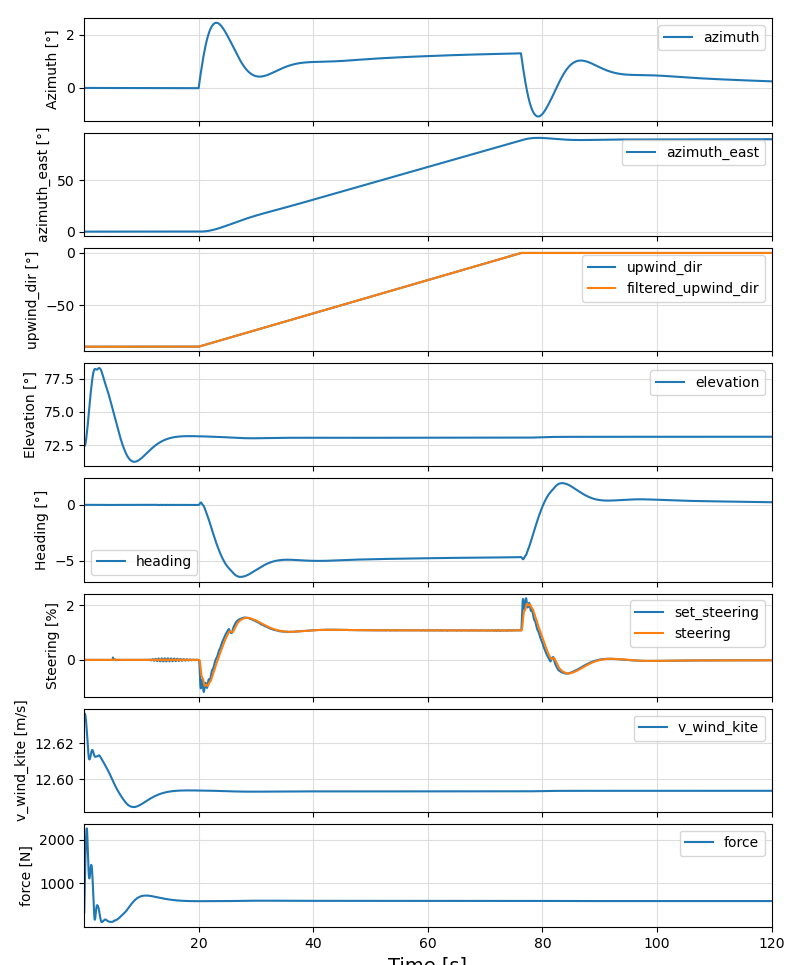
The example "parking_wind_dir.jl" produces the following output:
Without turbulence
With turbulence (8.9% turbulence intensity)
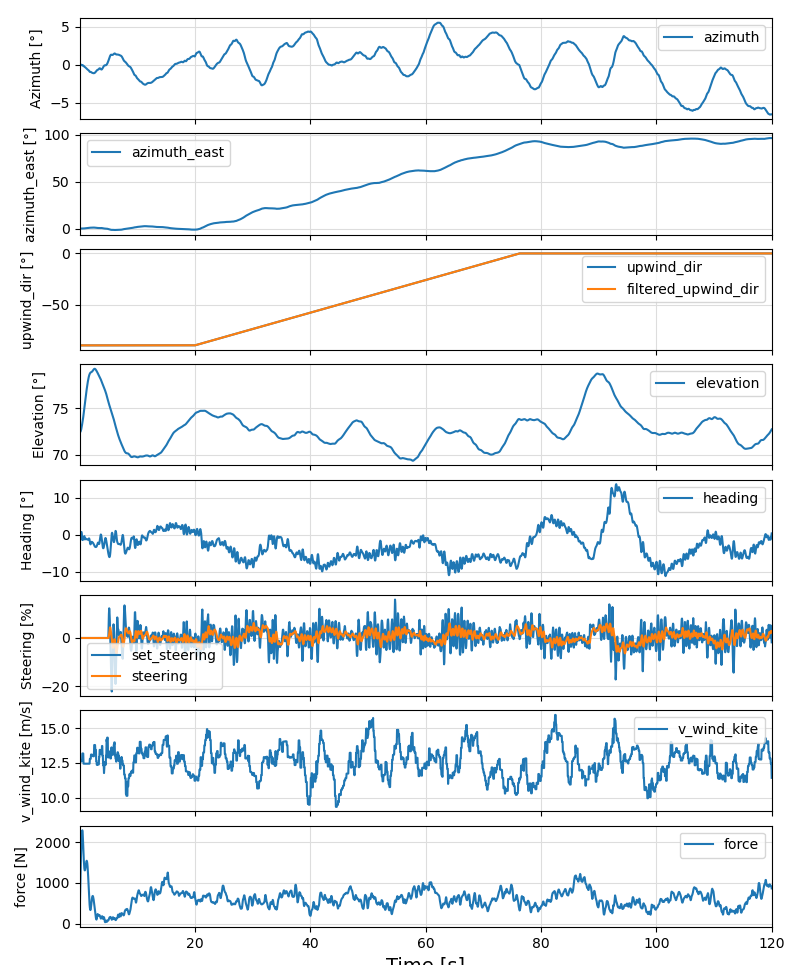
The turbulence intensity at the height of the kite is calculated and printed when running the example.